ZOOK MSG to EML Converter

Batch Export MSG to EML With Attachments at Once

Download MSG to EML Converter to Transform MSG Files into EML Format. Using this Tool, Users can Convert MSG to EML with Attachments in Bulk Mode.

  • Complete Conversion of MSG to EML with Attachments in Bulk.
  • Maintains Folder Hierarchy While Transforming MSG to EML Format.
  • Quick Solution to Convert MSG to EML Without Outlook
  • Batch Conversion of MSG to EML Format to Save MSG to EML File.
  • Preserves Entire Email Formatting Even After the Conversion.

Download Now   Buy Now

ZOOK Software

norton supportmcafee support

Descriptive Features of ZOOK MSG to EML Converter

convert msg to eml

Convert MSG to EML

MSG to EML Converter is a reliable solution to process the conversion of MSG to EML with attachments. It protects emails from being damage and gives accurate output without data losses. It easily converts MSG to EML format without Outlook.

preserve email details

Preserves Email Details

ZOOK MSG to EML Converter has an advance feature that helps user to convert Outlook MSG to EML format along with all email properties such as Meta data, images, hyperlinks, formatting, attachments, etc. without any alteration of data.

support multiple email client

Supports EML based clients

An application supports all the EML based email applications to perform the flawless conversion of MSG to EML format such as The Bat!, Thunderbird, Windows Live Mail, Windows Mail, Outlook Express, eM Client, DreamMail, etc.

retain original structure

Retains Folder Structure

It easily converts multiple MSG to EML file format by keeping environment familiar. It maintains the folder structure and preserves the way that is created originally in Output EML files in same folders and sub-folders.

creating new folders

Creates New Folder

Once the MSG to EML conversion is completed, user can store the converted EML files in a new folder that user can create from the software itself from the right panel. It makes easy for user to find the data from stored location after conversion.

export multiple mail

Offers Batch Conversion

User can add multiple MSG files on software at once by using batch conversion mode. It helps to save user’s time as it batch convert MSG to EML format at a time. Before using this mode user must keep all MSG files in one folder and choose "Select Folder" option.

Order Now - ZOOK MSG to EML Converter

Professional Solution to Save Multiple MSG Files to EML Format

For Home User

  • Suitable for Home User
  • Easily Migrate Multiple Files
  • Valid for 2 Machine
  • Valid for Single Geographical Location

$49

Buy Now

For Corporate

  • Suitable for Corporate User
  • Easily Export Multiple Files
  • Valid for Several Machines
  • Valid for Multiple Geographical Locations

$149

Buy Now

Note: After placing the order, you will get an email containing full version details within 15 minutes. So, please use correct email id. If you did not receive your full version details, please contact us via Email or Live Chat.

Procedural Screenshots of ZOOK MSG to EML Converter

Let's Get Started to Resolve Your Problem...

Download Now

Guide ‐ How to Transform MSG Emails to EML ?

Specifications of MSG to EML Converter

Trial Limitation

  • The Trial Version will export only 25 items from each folder.

Download Now

Compatible With

  • Compatible with Windows 10 & all below Windows Version (32 & 64 Bit)
  • Supports MSG Files of All MS Outlook Editions.

Pre-Requirements

  • Minimum of 1 GHz processor.
  • 512 MB of RAM memory. (1GB recommended)
  • 50 MB of free hard disk space for installation.

Frequently Asked Questions - Export MSG Files to EML Format

Let us Know About MSG to EML Converter to Move MSG Files to EML Format

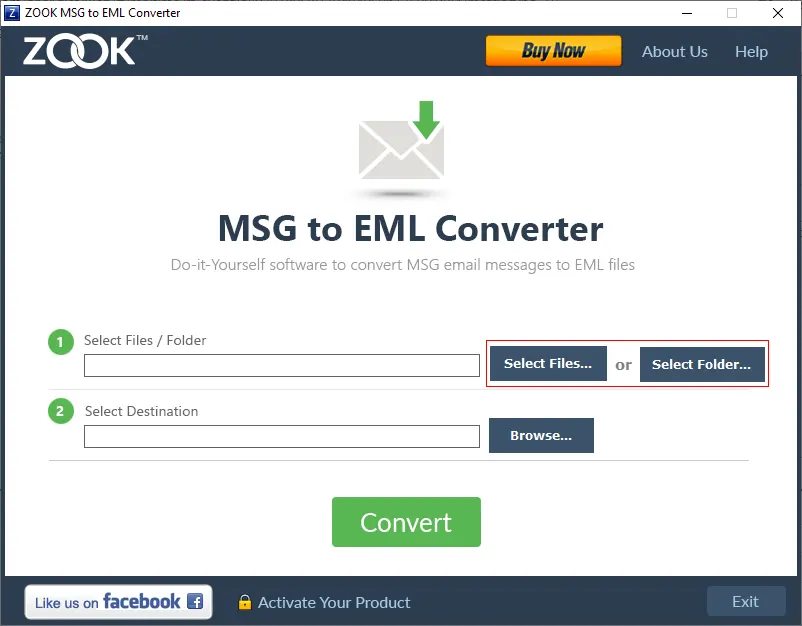
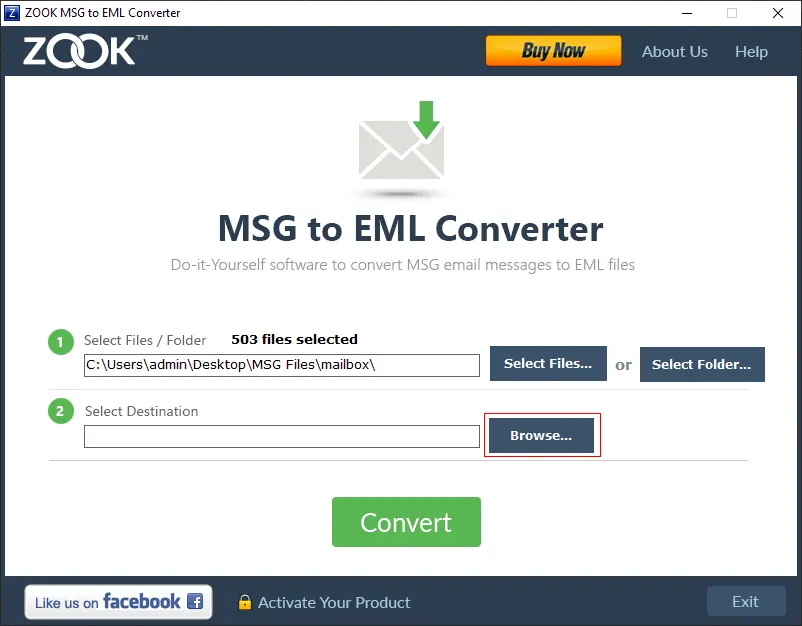
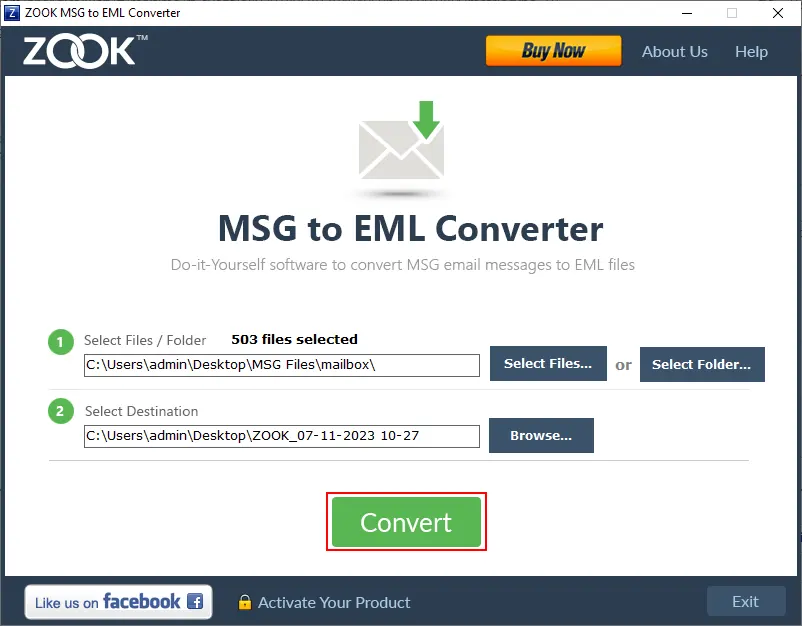
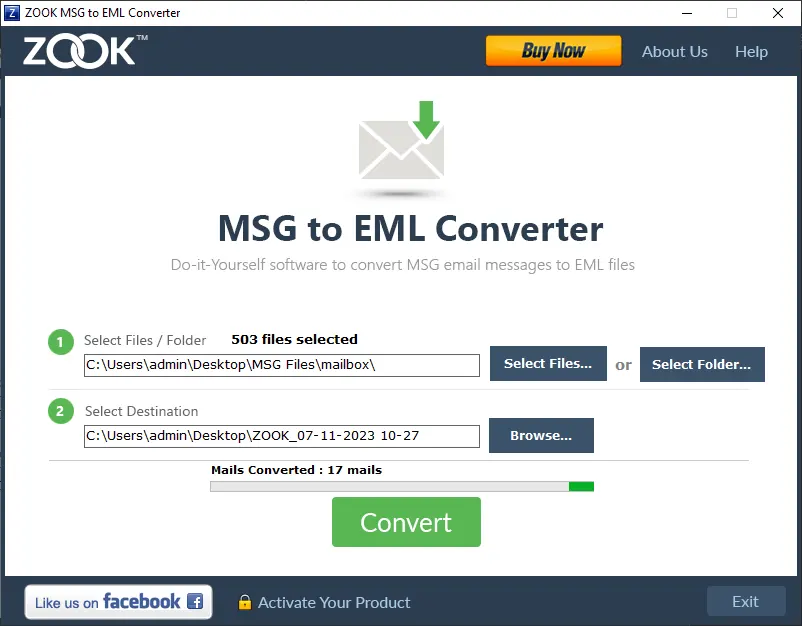
Whenever there is a requirement for MSG to EML Conversion, there does not exists any solution for converting emails messages from MSG to EML file format. ZOOK MSG to EML Converter is a straightforward solution to convert MSG to EML with attachments in just few clicks by following simple steps as described below: -
  • Download ZOOK MSG to EML Converter Tool and Launch It in Your System.
  • Click on Your Required Option to Browse and Add MSG Files Which Needs to be Converted i.e. "Select Files" or "Select Folder" Option.
  • In the Next Step, Click on "Browse" Button to Set Targeted Location to Save Resultant EML File.
  • Final step is to click on Convert button.

The tool supports only Windows OS and compatible with all edition of Windows, i.e. Windows 10, 8.1, 8, 7, Vista, XP, and all below editions to migrate Outlook MSG to Windows Live Mail EML format.

Yes, the tool maintains the structure even after conversion of the data. This software MSG to EML converter is capable to convert and save MSG to EML file format for EML based email clients such as Mac Mail, Windows Live Mail, etc.

Yes, the software is self-sufficient to convert MSG to EML without Outlook. It only requires MSG files to perform the conversion of MSG to EML format. Users can batch convert MSG to EML format to transform multiple MSG files to EML format.

Yes, the application is programmed in a way that it supports all EML based email applications. It is the best solution to change messages from MSG to EML in bulk.

There are many reasons for converting entire emails of MSG to EML file format. One of the most common reason is that users want to switch from Outlook to Windows Live Mail. Most of the users are looking to transform MSG to EML format because they find they found Windows Live Mail as more relevant than any other email application.

What Clients Says

Let Us Know What People Says about ZOOK MSG to EML Converter

You Might Be Interested in These Products Too